How a New Kind of Business Card Is Helping Small Business Owners Get More New Business
(What an NFC card actually is, how to set one up yourself, and the advantage that turned out to matter most)
AI Marketing Systems Strategist
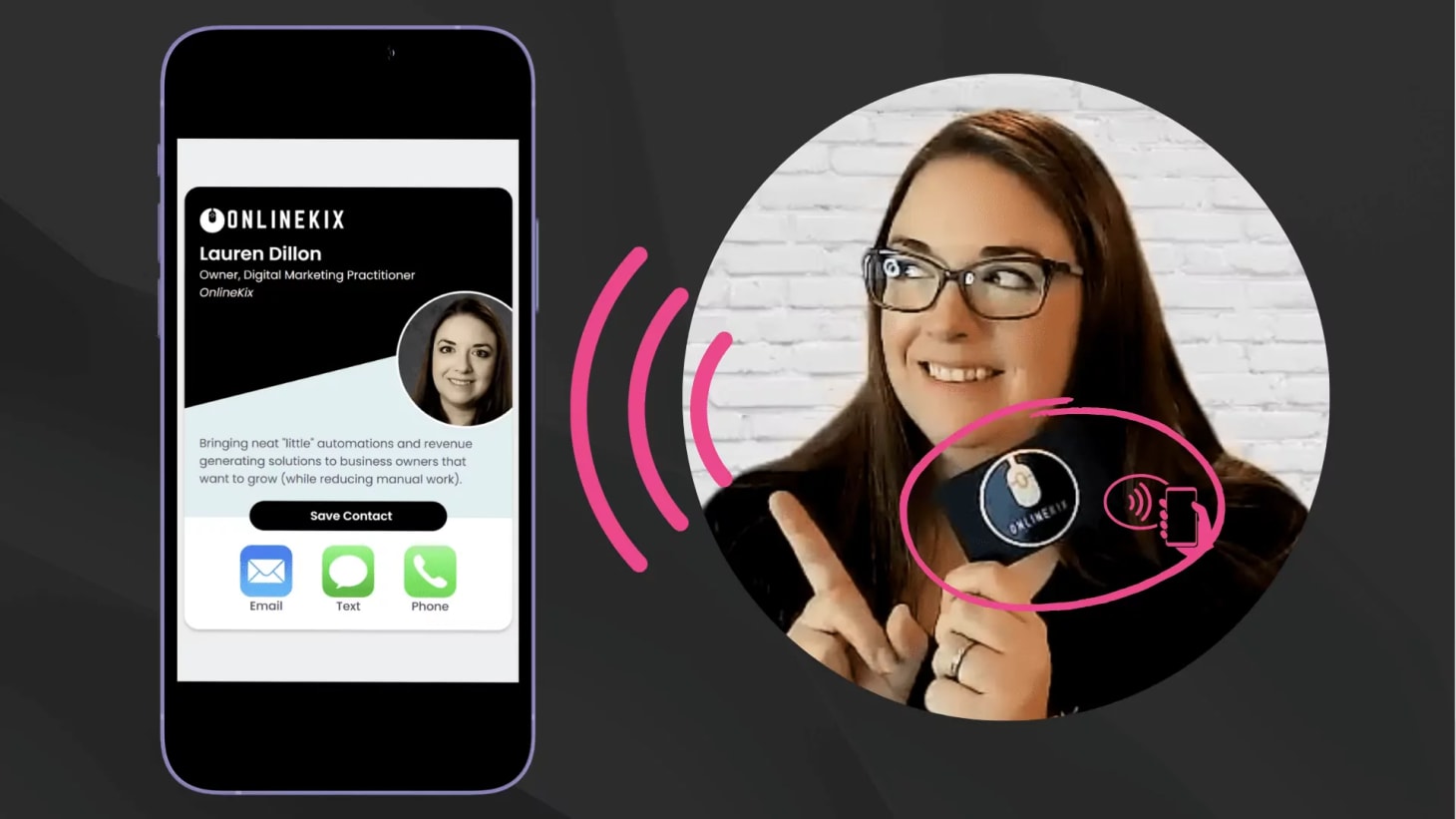
One of the hardest parts of marketing a small business is finding inexpensive ways to stand out. Not clever ways. Not expensive ways. Cheap ways that a person actually notices in the four seconds you have their attention.
And if you can stand out while also making it easier for someone to spend money with you, that is the rare combination that compounds.
So I want to walk you through one of the simplest changes we made in our own business, what it actually did, and how to do it yourself without paying anyone.
The change was replacing our paper business cards with NFC cards.
Here is the thing about a paper business card that took me an embarrassingly long time to notice. A paper card is a task you hand to someone else.
You are not giving them your contact details. You are giving them a small piece of homework and hoping they do it.
Think about what you are actually asking. Keep this rectangle safe. Remember, days later, why you kept it. Find it. Type nine or ten fields into your phone by hand, correctly. Then decide to reach out to someone you met once.
Most people mean to. Very few get there. And the failure is invisible to you, because nobody has ever called to say they lost your card. You just never hear from them, which looks exactly the same as not being interested.
Part 1Why the paper card quietly fails
Paper cards are not useless. They are just fragile in ways that are easy to miss, because every one of these failures happens after you have walked away.
It depends on someone else doing manual work
Typing a name, a business, a cell number, an email and a website into a phone takes about ninety seconds and a surprising amount of attention. In the moment you hand the card over, that cost is invisible to both of you. Three days later it is the only thing standing between a conversation and a customer, and ninety seconds is enough to lose.
It goes out of date and you cannot do anything about it
You change your cell number. You drop the landline. You rebrand, or add a service, or move locations. Every card already in the world still says the old thing, and the only fix is to reprint and redistribute, which nobody does. So the cards in circulation slowly become a slightly wrong version of your business.
It tells you nothing
This is the one that bothers me most as someone who likes measuring things. You hand out forty cards at an event. How many got typed in? How many led to a visit to your website? You have no idea. Not a rough idea. No idea at all. So you cannot tell whether events are worth your Thursday evenings, because the only instrument you have is your own memory of whether it felt busy.
And it is physically frail
It gets washed in a pocket. It gets used as a bookmark and vanishes into a book. It goes into the little tray by the door with the takeout menus. None of this is anyone's fault. It is just what happens to small pieces of card.
So the question is not whether paper cards are good or bad. The question is whether the handoff can be made to survive the three days after the handshake.
Part 2What an NFC card is, and the nine things it does
NFC stands for Near Field Communication. The short version: a tiny chip is embedded in the card with no battery in it at all. When a phone comes within an inch, the phone's own radio field powers the chip just enough for it to hand over one small piece of text. Usually that text is a web address.
That is genuinely all it is. It is not tracking anybody, it is not listening, it has no power source, and it cannot do anything until a phone is pressed almost against it.
The handoff then looks like this.
Step one. Hold the card close to the other person's phone. If their phone is older or has NFC switched off, they scan the QR code printed on the card instead.
Step two. Your profile opens on their screen. It looks like a business card, with your photo on it.
Step three. They press save, and you are in their phone properly, with your details spelled correctly.
Here is what that buys you, compared with paper.
-
Sharing takes one second instead of ninety
The details go across with a tap. Nothing to type, nothing to mistype, nothing to keep hold of until later. The work moves off the other person and onto the card, which is where it belongs.
-
You can change it after you have handed it out
This is the one that sounds small and is not. The card holds a link, and you control what sits at the other end of the link. New number, new service, new photo, new booking page. Every card you have ever given anyone updates at once, including the one in a stranger's wallet from eighteen months ago.
-
It can do more than contact details
A paper card has room for a name and a number. A profile page can carry a booking link, a portfolio, a menu, a review link, a video of you explaining what you do, directions, payment. Whatever the actual next step is in your business, it can be the button directly under your name.
-
You find out whether it worked
Because the card leads to a page, you can see how many people landed on it, when, and what they did next. After an event you have a number instead of a feeling. That alone changes how you decide where to spend your time.
-
People engage with it more
Partly the novelty, partly that tapping a card to a phone is a small moment of theatre in a conversation that was otherwise a formality. More on this below, because it turned out to be the point.
-
It survives being carried
These are PVC or metal, not card stock. One lives in your wallet permanently. It does not get soggy, dog eared or lost, because you are not giving it away.
-
It costs less over time
The first card costs more than a box of paper ones. But you buy it once, and you are not reprinting five hundred cards every time something about your business changes. The reprint you never have to do is where the saving actually is.
-
It uses less paper
One card instead of hundreds. Small thing, but a real one, and some of the people you hand it to will care.
-
It makes you look like you pay attention
Fair warning, this advantage has a shelf life. Right now a tap still gets a reaction. In five years it will be ordinary. But the signal it sends today, that you are the sort of operator who keeps up, is real while it lasts, and it is doing work in trades where people assume the opposite.
The one that turned out to matter
If I had to throw eight of those out and keep one, I would keep number five.
Across several of our own businesses, we tracked what happened after the card changed hands. Most paper cards end up in the trash, which we knew. What surprised us was the size of the gap on the other side. We saw roughly a 70% increase in genuine engagement with the card: people who tapped actually did something afterwards, and over a twelve month window a meaningfully larger share of them became customers or stayed in the network.
I want to be straight about what that number is and is not. It is our own measurement across our own businesses over about a year. It is not a controlled study, your trade is not my trade, and anyone quoting a precise percentage at you about their own product deserves a raised eyebrow, mine included. Treat it as the direction of travel, not a promise.
But the direction of travel was clear enough that we stopped printing paper cards. The novelty got us in the door in the short term. The thing that kept paying was that the connection survived the walk to the car.
Part 3Set one up yourself, in an afternoon
You can absolutely do this without hiring anyone, and I would rather you knew how it worked either way. Five steps. Budget an afternoon for the first one and about ten minutes for every one after that.
Step 1Decide what the tap should do
Do this. Before you buy anything, write down the single thing you want to happen after someone taps your card. One thing. Not a list.
Why it matters. This is the step people skip, and skipping it is why most digital cards end up as a slightly fancier way of showing a phone number. The tap is a moment of attention you have been handed. What it opens should be the actual next step in your business.
How. Pick based on how you get paid. A trade or clinic usually wants save my number and call me. Anyone with a calendar usually wants book a time. A restaurant wants see the menu. A consultant often wants see the work. If you genuinely cannot choose, choose save the contact, because that is the one that never expires.
Your output. One sentence: "When someone taps my card, I want them to ______."
Check. Read it to someone who does not work with you. If they can tell you what the button should say, it is specific enough.
Step 2Build the page the card points at
Do this. Make the page that opens when the card is tapped, and get it live at a real web address before you buy a single card.
Why it matters. The card is not the product. The card is a pointer. Everything that makes this work, updating details, adding a booking link, seeing the numbers, happens at the page, and the chip never needs touching again.
How. A single page on your own website is the best option, because you own it and it can never be taken away. Something like yourbusiness.com/card. Put on it, in this order: your photo, your name, your business, one line on what you do and who for, then a save contact button, then the one action you chose in step one, then everything else. Keep it to one screen before scrolling. Add a vCard download so saving is one tap, and make your phone number a real tel: link so it dials.
Your output. A live URL you can open on your own phone.
Check. Open it on a phone over cellular data with the wifi off. If it takes more than about three seconds, fix that now. You will be standing in front of someone while it loads.
Step 3Buy blank cards and write your link to them
Do this. Order blank NFC cards, install a tag writing app, and write your URL onto the chip.
Why it matters. This is the part that sounds technical and takes about four minutes. The chip holds a short piece of text. You are writing a web address into it.
How. Buy blank NTAG215 or NTAG216 cards. They run a couple of dollars each and the chip type is printed in the listing. Install a tag writing app on an Android phone or a recent iPhone, choose write, choose URL or link, paste the address from step two, then hold the card against the back of the phone until it confirms. Buy at least three. You will want spares and you will want one to experiment on.
A warning worth reading twice. These apps all offer to lock or protect the tag so it cannot be rewritten. That is permanent. A locked tag with the wrong URL on it is landfill. Do not lock anything until you have finished testing, and honestly, consider never locking it.
Your output. A card that opens your page when you tap your own phone to it.
Check. Tap it with the phone locked and in your pocket, then pull it out. The link should appear as a notification you can tap.
Step 4Print the QR code, because not every phone will tap
Do this. Generate a QR code pointing at the same URL and get it printed on the card.
Why it matters. NFC is not universal, and the gaps are predictable. On iPhone, the XS, XS Max and XR generation and everything after, including the second generation SE and newer, read tags automatically with no app. The iPhone 7, 7 Plus, 8, 8 Plus and X can read tags, but somebody has to switch on the NFC Tag Reader in Control Center first, which is not a conversation you want to have while networking. Even on a modern iPhone, background reading only works when the phone has been unlocked at least once since it was last restarted. Android has had NFC for years but it can be switched off in settings.
In other words, a tap will fail sometimes, in public, and it will feel awkward. The QR code is what turns that into a non event.
How. Generate a QR for the same URL, keep it at least three quarters of an inch square on the finished card, and leave pale space around it. Print it on the back, not over artwork. If you can, use a QR that you can repoint later, so the printed code is not welded to one address forever.
Your output. A card that works two ways.
Check. Scan it with the native camera app on both an iPhone and an Android, from about a foot away, in poor light.
Step 5Test it on real phones, then rehearse the handoff
Do this. Test on at least one iPhone and one Android that are not yours. Then practice saying the line out loud.
Why it matters. The technology is the easy half. The awkward half is that handing someone a card they have to touch their phone to is a new social move, and if you fumble the explanation it lands as a gimmick instead of as competence.
How. Borrow two phones. Tap, scan, save the contact, and then actually look at the saved contact to check your name and number came through correctly and your photo is attached. Then write your line. Mine is close to: "I don't carry paper ones, can I just tap it to your phone?" Short, slightly apologetic, gives them the choice. It works because it does not make a performance of it.
Your output. A card that works on hardware you do not control, and a sentence you can say without thinking.
Check. Hand it to someone who has never seen one and say nothing. Whatever they do next tells you whether your card needs clearer instructions printed on it.
Part 4Or have it done for you
If you are doing this yourself, here is a realistic first week.
- Day one. Write the one sentence from step one. Ten minutes.
- Day two. Build the page and get it live. This is the longest part, perhaps two hours if you already have somewhere to put it.
- Day three. Order the blank cards. Then wait, because shipping is the real bottleneck.
- The day they arrive. Write the chip, test it, do not lock it.
- That week. Get the QR printed, test on borrowed phones, rehearse the line.
None of that is hard. All of it is genuinely doable. I have given you the whole method above and nothing is held back.
But I will be honest about where it stalls, because I have watched it stall. It is almost never the chip. It is step two. Building a page that loads fast, looks like you, saves a contact properly on both iPhone and Android, and does not look like a free link-in-bio page is a web job, and it is the point at which "I'll do it this weekend" becomes three weekends and then a drawer with some blank cards in it.
Here is my sincere recommendation and request
Setting up an NFC business card is something you can absolutely do on your own. I know your time is not free, though, and this is something we build for people constantly.
The Smart Digital Business Card
We build the whole thing and mail it to you. You are not assembling anything.
- The wallet card itself, with the NFC chip already written and tested.
- A smart QR code printed on the card, so it still works on an older phone or one with NFC turned off.
- Your digital profile page, built and hosted, with your photo, your details and your action buttons. No app for anyone to download, and it works natively on iPhone and Android.
- Done for you setup and shipping, included.
$99.95, one time. Cards normally arrive within 7 to 14 business days. We build your profile from the cell number and email you give at checkout, and once the card lands we get on a call to make any edits, answer questions, and show you the one feature I have deliberately not written about here.
Order your Smart Digital Business Card
Built by my team at OnlineKix. If you would rather do it yourself, everything above is the real method and I would genuinely rather you had a card you made than no card at all.
If you do build your own, send me the link. I would like to see it.